Visual Accuracy & Speed Test
Measure how long it takes you to detect a mutated address (phishing attack) using the visual aid of 3x3 mosaics compared across both chromatic modes.
Turn every XRPL address into a unique visual and acoustic keychain. Detect phishing and clipboard hijacking before signing — without reading 34 characters one by one.
Paste address → preview mosaic → connect Xaman → mint Soulbound NFT.
From your Xaman app: copy your address (starts with r). Never paste your secret key.
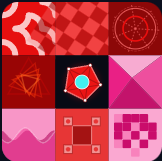
This pattern is unique to your address. Memorize 2–3 details (colors, central shape, corners).
Install Xaman on your phone. Ensure enough free XRP for the NFT owner reserve (shown before mint).
Not connected yet
Your NFT URI anchors a keychain package: visual mosaic (SVG) + acoustic signature (WAV) + metadata manifest. Sign in Xaman when prompted.
——Your Mosaic Keychain is a self-issued Soulbound NFT (taxon 1001, Issuer = Owner). Verify anytime on the public checker.
Need to reclaim your XRP owner reserve? Burn the NFT — costs are fetched live from the ledger before you confirm.
Paste a public XRPL address (starts with r). The mosaic appears instantly — no button press needed.
💡 Tip: change a single character and watch the mosaic transform completely.
This drawing is your visual keychain. Memorize colors, shapes, and central anchor position.
Loading...
The hash is divided into 9 parts of 3 bytes. Each cell renders a different geometry (Voronoi, truchet, pixels, etc.) parameterized by its respective bytes.
Paste the expected address (A) and the copied address (B). If mosaics or melodies differ, do not sign.
Address you expect to send to
Address from clipboard or wallet
Connect your wallet, mint a Soulbound NFT, and anchor your mosaic on the blockchain. We recommend Xaman (mobile app); Gem Wallet is the browser alternative.
You need the Xaman app installed and at least ~2 XRP free on Mainnet for the NFT.
Mint a Soulbound NFT (non-transferable) that proves your mosaic on-chain. Xaman (mobile) or Gem Wallet (browser).
Measure how long it takes you to detect a mutated address (phishing attack) using the visual aid of 3x3 mosaics compared across both chromatic modes.
Compare the geometric pattern, the anchors, and listen to the audios of the options. Then click the identical mosaic to submit your answer.
⚠️ MATCHING RULE: The correct option must be visually and audibly identical to the target — click it to confirm.
Aggregated local metrics and usability study data.
Perform at least 3 tests in each mode to see the cognitive performance analysis and verify which proposal is more effective against human visual fatigue.
Version 1.0 · Experimental software
Cryptographic Mosaic is an experimental tool. Its use, interpretation, and application — including any XRPL transaction you sign — are entirely your responsibility, not CuevazaArt's.